在 Apache Flink 中,数据倾斜是指在分布式数据处理过程中发生的数据分布不均衡现象。数据倾斜表现为某些节点或分区处理的数据量远多于其他节点,导致数据反压、频繁GC甚至OOM一系列问题,从而影响整个系统的性能和效率。本小节主要讲解如何对Flink中的数据倾斜进行优化。
12.6.1 数据倾斜的影响
在Flink中出现数据倾斜时会带来如下影响:
- 数据反压严重:往往产生数据倾斜时,导致某个subtask处理数据量非常大,从而会产生反压问题。
- GC频繁问题:某个subtask处理数据量特别大,可能会使JVM的内存资源短缺,导致频繁的GC,甚至出现TaskManager OOM问题,最终导致任务失败。
- watermark延迟严重:数据倾斜导致某个subtask处理数据量大,数据流动缓慢,watermark延迟大,不更新推进问题。
12.6.2 定位数据倾斜
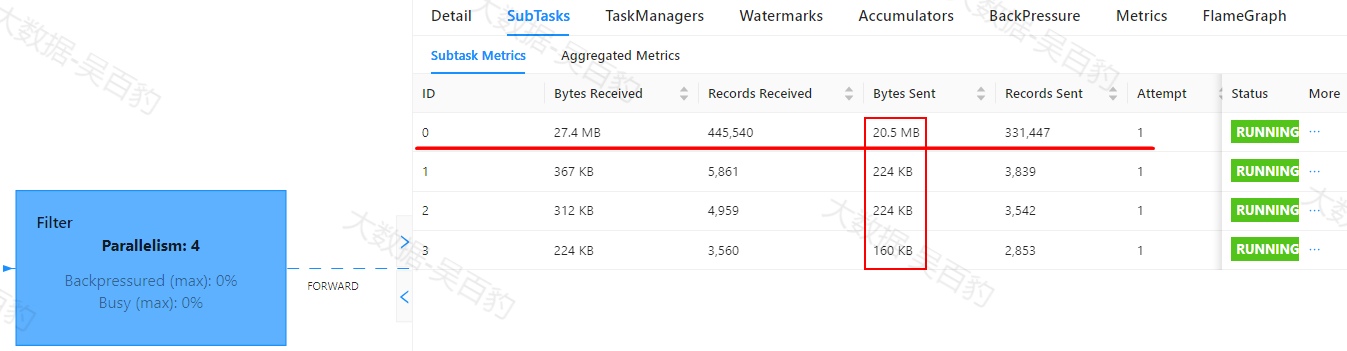
Flink中出现数据倾斜时往往会产生反压,我们可以通过Flink WebUI观察反压信息来进一步确定是否有数据倾斜问题。同时可以进入出现反压算子的下个算子subtask执行详情页面,观察每个subtask处理数据量和接收数据条数来判断是否出现倾斜,一般某个subtask处理数据量多且相比其他subtask处理数据量相差10倍以上,极有可能出现数据倾斜问题。
如下案例中,首先通过自定义source在源头对数据模拟倾斜,并当遇到基站id为sid_0多生产100倍数据模拟sid_0基站数据相比其他基站数据多,后续又经过filter、flatMap、map、keyBy、sum等操作对数据进行处理。为了能通过WebUI清晰的看到数据倾斜效果,代码关闭了算子链、设置并行度为4并以本地模式运行。
//1.使用本地模式
Configuration conf = new Configuration();
//设置WebUI绑定的本地端口
conf.setString(RestOptions.BIND_PORT,"8081");
//使用配置
StreamExecutionEnvironment env = StreamExecutionEnvironment.createLocalEnvironmentWithWebUI(conf);

//StreamExecutionEnvironment env = StreamExecutionEnvironment.getExecutionEnvironment();

//2.关闭算子链
env.disableOperatorChaining();

//3.设置并行度为4
env.setParallelism(4);

//4.自定义源,模拟数据源头存在数据倾斜
DataStreamSource<StationLog> ds1 = env.addSource(new RichParallelSourceFunction<StationLog>() {
    Boolean flag = true;

    /**
     * 主要方法:启动一个Source,大部分情况下都需要在run方法中实现一个循环产生数据
     * 这里计划1s 产生1条基站数据,由于是并行,当前节点有几个core就会有几条数据
     */
    @Override
    public void run(SourceContext<StationLog> ctx) throws Exception {
        Random random = new Random();
        String[] callTypes = {"fail", "success", "busy", "barring"};

        // 获取当前子任务的索引
        int subtaskIndex = getRuntimeContext().getIndexOfThisSubtask();

        while (flag) {
            String sid = "sid_" + random.nextInt(10);

            // 如果是0号子任务,生成更多数据
            if (subtaskIndex == 0) {
                for (int i = 0; i < 100; i++) {
                    // 数据生成逻辑
                    generateData(ctx, random, sid, callTypes);
                }
            } else {
                // 数据生成逻辑
                generateData(ctx, random, sid, callTypes);
            }
            Thread.sleep(50);

        }

    }

    private void generateData(SourceContext<StationLog> ctx, Random random, String sid, String[] callTypes) {
        String callOut = "1811234" + (random.nextInt(9000) + 1000);
        String callIn = "1915678" + (random.nextInt(9000) + 1000);
        String callType = callTypes[random.nextInt(4)];
        Long callTime = System.currentTimeMillis();
        Long durations = Long.valueOf(random.nextInt(50) + "");
        if (sid.equals("sid_0")) {
            for (int i = 0; i < 100; i++) {
                ctx.collect(new StationLog(sid, callOut, callIn, callType, callTime, durations));

            }
        }
        ctx.collect(new StationLog(sid, callOut, callIn, callType, callTime, durations));
    }

    //当取消对应的Flink任务时被调用
    @Override
    public void cancel() {
        flag = false;
    }
});

//5.过滤通话状态不为fail的数据
SingleOutputStreamOperator<StationLog> ds2 = ds1.filter(new FilterFunction<StationLog>() {
    @Override
    public boolean filter(StationLog value) throws Exception {
        return !"fail".equals(value.callType);
    }
});

//6.使用flatMap对数据处理,这里仅仅是返回当前数据
SingleOutputStreamOperator<StationLog> ds3 = ds2.flatMap(new FlatMapFunction<StationLog, StationLog>() {
    @Override
    public void flatMap(StationLog value, Collector<StationLog> out) throws Exception {
        out.collect(value);
    }
});

//7.对数据使用map 处理,转换成key,value格式数据,key:基站,value:计数
SingleOutputStreamOperator<Tuple2<String, Long>> ds4 = ds3.map(new RichMapFunction<StationLog, Tuple2<String, Long>>() {


    @Override
    public Tuple2<String, Long> map(StationLog value) throws Exception {
        return new Tuple2<String, Long>(value.sid , 1L);
    }
});

//8.使用keyby按sid进行分组
KeyedStream<Tuple2<String, Long>, String> ds5 = ds4.keyBy(new KeySelector<Tuple2<String, Long>, String>() {
    @Override
    public String getKey(Tuple2<String, Long> value) throws Exception {
        return value.f0;
    }
});

//9.统计每个基站对应的数据量
SingleOutputStreamOperator<Tuple2<String, Long>> result = ds5.sum(1);

result.print();
env.execute();
以上代码运行后,可以通过Flink WebUI观察到数据处理存在数据倾斜问题。


12.6.3 数据倾斜原因及解决方式
Flink中产生数据倾斜的原因主要就是两个方面,一个是业务数据本身存在数据倾斜,例如:一线城市外卖单量明显比三、四线小城市外卖订单量要大 ;另一个是Flink业务处理中按照某个key进行聚合操作,例如:使用keyby算子对数据分组造成了数据倾斜。下面分别对这两种情况进行分析并提出解决数据倾斜思路。
12.6.3.1 数据源本身数据倾斜
当Flink读取的数据源本身出现数据倾斜时,Flink读取过来数据极大概率也是倾斜的,这种情况下我们可以对读取过来的数据使用shuffle或者rebalance进行分区操作,这样就可以将读取过来不均匀的数据均匀的发送给Flink各个subtask进行处理。也可以改变上下游算子的并行度来解决这种倾斜问题,当上下游算子并行度不一致时,Flink默认就会使用rebalance partitioner分区策略,解决数据倾斜问题。
例如Flink读取Kafka数据时,Source并行度一般建议与读取Kafka的topic分区数保持一致,但如果某个分区出现数据倾斜,可以设置source后续操作的并行度为topic的整数倍或者更多,这样Flink后续处理并行度与Source并行度数不一致,自动采用rebalance分区策略解决数据倾斜问题。
如上案例中,ds1出现数据倾斜,可以在对ds1进行转换前调用shuffle或者rebalance方法设置分区策略,这样后续SubTask处理数据时就会均匀。如下代码:
... ...
 //过滤通话状态不为fail的数据
//        SingleOutputStreamOperator<StationLog> ds2 = ds1.shuffle().filter(new FilterFunction<StationLog>() {
        SingleOutputStreamOperator<StationLog> ds2 = ds1.rebalance().filter(new FilterFunction<StationLog>() {
            @Override
            public boolean filter(StationLog value) throws Exception {
                return !"fail".equals(value.callType);
            }
        });
        SingleOutputStreamOperator<StationLog> ds3 = ds2.flatMap(new FlatMapFunction<StationLog, StationLog>() {
            @Override
            public void flatMap(StationLog value, Collector<StationLog> out) throws Exception {
                out.collect(value);
            }
        });
... ...
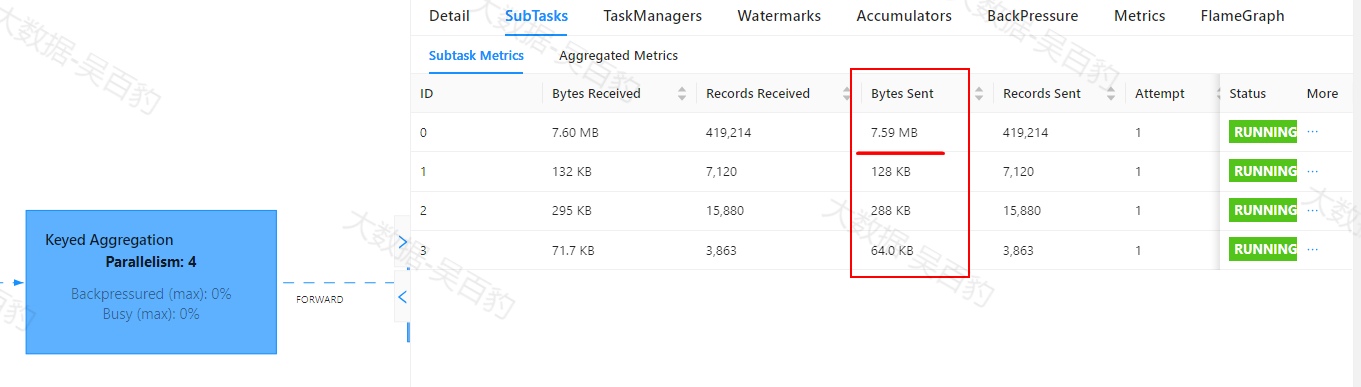
以上代码修改后,执行,可以看到源头数据虽有倾斜,但在后续阶段算子处理时,各个subtask处理的数据已经很均匀。


12.6.3.2 KeyBy导致数据倾斜
针对以上案例虽然使用shuffle或者rebalance方法设置分区策略解决了源头数据倾斜问题,但在代码业务逻辑中通过了keyby按照基站id进行分组,数据中本身基站sid_0的数据较其他基站id数据量大,所以keyby后的数据还是存在数据倾斜。下面介绍Flink中KeyBy分组导致数据倾斜的情况处理。
计算框架中处理由于分组导致的数据的场景往往采用双重聚合方式,即:首先对分组的key进行随机加前缀聚合,然后再对聚合结果去掉前缀再次聚合。在Flink实时数据处理场景中,针对KeyBy导致的数据倾斜不能统一简单的使用双重聚合方式操作,因为在Flink中对DataStream使用KeyBy后可以进行简单的聚合操作(例如:sum/count),也可以进行窗口设置(例如:timewindow)。如果keyby导致数据倾斜的场景是简单的聚合操作,由于数据流是实时向下游传递,再使用双重聚合方式反而无效甚至导致数据统计结果不准确,这时需要保证第一阶段聚合后的结果不能实时完后传递,可以通过手动方式进行攒批处理后统一向下游传递来保证最终结果的正确性。如果keyby导致数据倾斜的场景是窗口操作那么可以使用双重聚合方式。
- KeyBy简单聚合操作解决数据倾斜方式
以上案例业务是对基站id进行keyby分组后进行简单聚合,基站id sid_0出现严重数据倾斜。解决这种数据倾斜方式首先对分组key进行随机加前缀,然后分组进行第一次聚合,对聚合的结果攒批向下游传递。然后对第一次聚合后的结果进行去前缀,再次聚合即可。
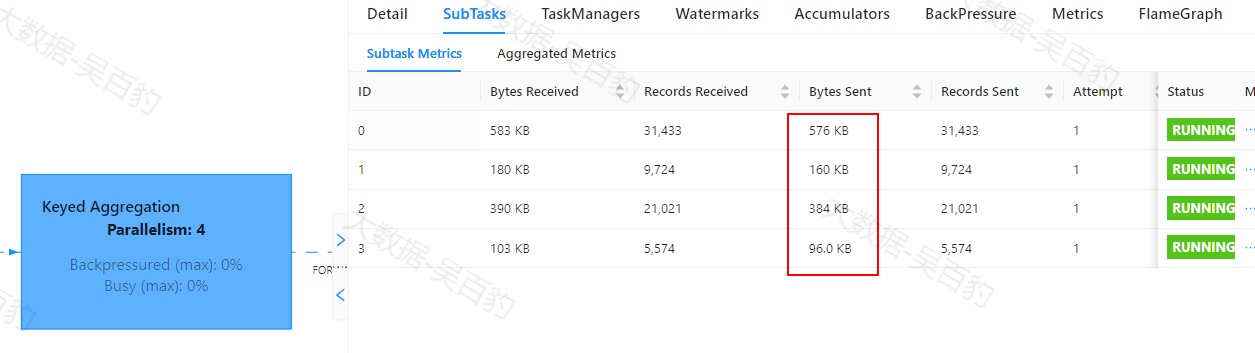
以下代码对ds3进行随机加1000前缀,分组后在flatMap中进行第一次聚合结果累加,当累计10000条数据后,统一将聚合结果向下游传递,然后再进行keyby分组和第二次聚合操作。
//1.使用本地模式
Configuration conf = new Configuration();
//设置WebUI绑定的本地端口
conf.setString(RestOptions.BIND_PORT,"8081");
//使用配置
StreamExecutionEnvironment env = StreamExecutionEnvironment.createLocalEnvironmentWithWebUI(conf);

//StreamExecutionEnvironment env = StreamExecutionEnvironment.getExecutionEnvironment();

//关闭算子链
env.disableOperatorChaining();
//设置并行度为4
env.setParallelism(4);

DataStreamSource<StationLog> ds1 = env.addSource(new RichParallelSourceFunction<StationLog>() {
    Boolean flag = true;

    /**
     * 主要方法:启动一个Source,大部分情况下都需要在run方法中实现一个循环产生数据
     * 这里计划1s 产生1条基站数据,由于是并行,当前节点有几个core就会有几条数据
     */
    @Override
    public void run(SourceContext<StationLog> ctx) throws Exception {
        Random random = new Random();
        String[] callTypes = {"fail", "success", "busy", "barring"};

        // 获取当前子任务的索引
        int subtaskIndex = getRuntimeContext().getIndexOfThisSubtask();

        while (flag) {
            String sid = "sid_" + random.nextInt(10);

            // 如果是0号子任务,生成更多数据
            if (subtaskIndex == 0) {
                for (int i = 0; i < 100; i++) {
                    // 数据生成逻辑
                    generateData(ctx, random, sid, callTypes);
                }
            } else {
                // 数据生成逻辑
                generateData(ctx, random, sid, callTypes);
            }
            Thread.sleep(50);

        }

    }

    private void generateData(SourceContext<StationLog> ctx, Random random, String sid, String[] callTypes) {
        String callOut = "1811234" + (random.nextInt(9000) + 1000);
        String callIn = "1915678" + (random.nextInt(9000) + 1000);
        String callType = callTypes[random.nextInt(4)];
        Long callTime = System.currentTimeMillis();
        Long durations = Long.valueOf(random.nextInt(50) + "");
        if (sid.equals("sid_0")) {
            for (int i = 0; i < 100; i++) {
                ctx.collect(new StationLog(sid, callOut, callIn, callType, callTime, durations));

            }
        }
        ctx.collect(new StationLog(sid, callOut, callIn, callType, callTime, durations));
    }

    //当取消对应的Flink任务时被调用
    @Override
    public void cancel() {
        flag = false;
    }
});

//过滤通话状态不为fail的数据
SingleOutputStreamOperator<StationLog> ds2 = ds1.shuffle().filter(new FilterFunction<StationLog>() {
    @Override
    public boolean filter(StationLog value) throws Exception {
        return !"fail".equals(value.callType);
    }
});
SingleOutputStreamOperator<StationLog> ds3 = ds2.flatMap(new FlatMapFunction<StationLog, StationLog>() {
    @Override
    public void flatMap(StationLog value, Collector<StationLog> out) throws Exception {
        out.collect(value);
    }
});

//对数据随机加前缀
SingleOutputStreamOperator<Tuple2<String, Long>> ds4 = ds3.map(new RichMapFunction<StationLog, Tuple2<String, Long>>() {

    @Override
    public Tuple2<String, Long> map(StationLog value) throws Exception {
        Random random = new Random();
        return new Tuple2<String, Long>(random.nextInt(1000)+"-"+value.sid , 1L);
    }
});

//分组
KeyedStream<Tuple2<String, Long>, String> ds5 = ds4.keyBy(new KeySelector<Tuple2<String, Long>, String>() {
    @Override
    public String getKey(Tuple2<String, Long> value) throws Exception {
        return value.f0;
    }
});

//聚集100条数据进行统计一次,并将结果输出
SingleOutputStreamOperator<Tuple2<String, Long>> ds6 = ds5.flatMap(new FlatMapFunction<Tuple2<String, Long>, Tuple2<String, Long>>() {
    //用于计数,满100条就输出数据
    private int count=0;

    //创建map存储数据统计结果
    private Map<String, Long> dataMap = new HashMap<String, Long>();

    @Override
    public void flatMap(Tuple2<String, Long> value, Collector<Tuple2<String, Long>> out) throws Exception {
        //每条数据对count计数
        count++;
        //当前数据key
        String key = value.f0;

        if (dataMap.containsKey(key)) {
            dataMap.put(key, dataMap.get(key) + 1L);
        } else {
            dataMap.put(key, 1L);
        }

        if (count == 10000) {
            //count达到10000就输出结果
            for (Map.Entry<String, Long> one : dataMap.entrySet()) {
                out.collect(new Tuple2<>(one.getKey(), one.getValue()));
            }

            //清空count,清空map
            count = 0;
            dataMap.clear();
        }

    }
});

//去掉前缀
SingleOutputStreamOperator<Tuple2<String, Long>> ds7 = ds6.map(new MapFunction<Tuple2<String, Long>, Tuple2<String, Long>>() {
    @Override
    public Tuple2<String, Long> map(Tuple2<String, Long> value) throws Exception {
        String realKey = value.f0.split("-")[1];
        return new Tuple2<>(realKey, value.f1);
    }
});

//第二次keyby 并 sum聚合
KeyedStream<Tuple2<String, Long>, String> ds8 = ds7.keyBy(new KeySelector<Tuple2<String, Long>, String>() {
    @Override
    public String getKey(Tuple2<String, Long> value) throws Exception {
        return value.f0;
    }
});

SingleOutputStreamOperator<Tuple2<String, Long>> result = ds8.sum(1);

result.print();

env.execute();
以上代码运行后,可以看到keyby数据倾斜问题缓解很多。
- KeyBy窗口操作解决数据倾斜方式
如下代码案例与之前数据倾斜案例类似,代码中KeyBy后设置窗口并进行基站通话时长统计。
/1.使用本地模式
Configuration conf = new Configuration();
//设置WebUI绑定的本地端口
conf.setString(RestOptions.BIND_PORT,"8081");
//使用配置
StreamExecutionEnvironment env = StreamExecutionEnvironment.createLocalEnvironmentWithWebUI(conf);

//StreamExecutionEnvironment env = StreamExecutionEnvironment.getExecutionEnvironment();

//关闭算子链
env.disableOperatorChaining();
//设置并行度为4
env.setParallelism(4);

DataStreamSource<StationLog> ds1 = env.addSource(new RichParallelSourceFunction<StationLog>() {
    Boolean flag = true;

    /**
     * 主要方法:启动一个Source,大部分情况下都需要在run方法中实现一个循环产生数据
     * 这里计划1s 产生1条基站数据,由于是并行,当前节点有几个core就会有几条数据
     */
    @Override
    public void run(SourceContext<StationLog> ctx) throws Exception {
        Random random = new Random();
        String[] callTypes = {"fail", "success", "busy", "barring"};

        // 获取当前子任务的索引
        int subtaskIndex = getRuntimeContext().getIndexOfThisSubtask();

        while (flag) {
            String sid = "sid_" + random.nextInt(10);

            // 如果是0号子任务,生成更多数据
            if (subtaskIndex == 0) {
                for (int i = 0; i < 100; i++) {
                    // 数据生成逻辑
                    generateData(ctx, random, sid, callTypes);
                }
            } else {
                // 数据生成逻辑
                generateData(ctx, random, sid, callTypes);
            }
            Thread.sleep(50);

        }

    }

    private void generateData(SourceContext<StationLog> ctx, Random random, String sid, String[] callTypes) {
        String callOut = "1811234" + (random.nextInt(9000) + 1000);
        String callIn = "1915678" + (random.nextInt(9000) + 1000);
        String callType = callTypes[random.nextInt(4)];
        Long callTime = System.currentTimeMillis();
        Long durations = Long.valueOf(random.nextInt(50) + "");
        if (sid.equals("sid_0")) {
            for (int i = 0; i < 100; i++) {
                ctx.collect(new StationLog(sid, callOut, callIn, callType, callTime, durations));

            }
        }
        ctx.collect(new StationLog(sid, callOut, callIn, callType, callTime, durations));
    }

    //当取消对应的Flink任务时被调用
    @Override
    public void cancel() {
        flag = false;
    }
});

//设置watermark
SingleOutputStreamOperator<StationLog> ds2 = ds1.assignTimestampsAndWatermarks(
        WatermarkStrategy.<StationLog>forBoundedOutOfOrderness(Duration.ofSeconds(2))
                .withTimestampAssigner(new SerializableTimestampAssigner<StationLog>() {
                    @Override
                    public long extractTimestamp(StationLog element, long recordTimestamp) {
                        return element.callTime;
                    }
                }).withIdleness(Duration.ofSeconds(5))
);

//过滤通话状态不为fail的数据
SingleOutputStreamOperator<StationLog> ds3 = ds2.shuffle().filter(new FilterFunction<StationLog>() {
    @Override
    public boolean filter(StationLog value) throws Exception {
        return !"fail".equals(value.callType);
    }
});

//转换数据
SingleOutputStreamOperator<Tuple2<String, Long>> ds4 = ds3.map(new MapFunction<StationLog, Tuple2<String, Long>>() {
    @Override
    public Tuple2<String, Long> map(StationLog value) throws Exception {
        return new Tuple2<>(value.sid, value.duration);
    }
});

//分组
KeyedStream<Tuple2<String, Long>, String> ds5 = ds4.keyBy(new KeySelector<Tuple2<String, Long>, String>() {
    @Override
    public String getKey(Tuple2<String, Long> value) throws Exception {
        return value.f0;
    }
});

//设置窗口
WindowedStream<Tuple2<String, Long>, String, TimeWindow> ds6 = ds5.window(TumblingEventTimeWindows.of(Time.seconds(5)));

SingleOutputStreamOperator<Tuple2<String, Long>> ds7 = ds6.process(new ProcessWindowFunction<Tuple2<String, Long>, Tuple2<String, Long>, String, TimeWindow>() {

    @Override
    public void process(String key,
                        ProcessWindowFunction<Tuple2<String, Long>, Tuple2<String, Long>, String, TimeWindow>.Context context,
                        Iterable<Tuple2<String, Long>> iterable,
                        Collector<Tuple2<String, Long>> collector) throws Exception {
        Long totalDuration = 0L;
        for (Tuple2<String, Long> info : iterable) {
            totalDuration += info.f1;
        }
        collector.collect(new Tuple2<>(key, totalDuration));
    }
});

ds7.print();

env.execute();
以上代码中基站sid_0存在数据倾斜,在keyby后设置window窗口处理中同样也有数据倾斜问题。运行以上代码,可以通过webui观察到数据倾斜。

由于Flink中设置窗口本身就类似一种批处理,所以解决这种keyby后进行window处理的数据倾斜问题,可以直接像Spark中使用双重聚合解决即可。解决思路:首先对分组key进行随机加前缀打散,然后分组并设置窗口,窗口内进行第一次数据的聚合,然后将结果进行去前缀,然后再按照去掉前缀的key进行聚合,最终得到每个窗口的结果数据。由于最终统计的是Flink每个窗口对应的结果数据,在去前缀操作中需要保留窗口的起始信息,这样才能在第二次聚合时保证相同窗口数据进行聚合操作。
//1.使用本地模式
        Configuration conf = new Configuration();
        //设置WebUI绑定的本地端口
        conf.setString(RestOptions.BIND_PORT,"8081");
        //使用配置
        StreamExecutionEnvironment env = StreamExecutionEnvironment.createLocalEnvironmentWithWebUI(conf);

        //StreamExecutionEnvironment env = StreamExecutionEnvironment.getExecutionEnvironment();

        //关闭算子链
        env.disableOperatorChaining();
        //设置并行度为4
        env.setParallelism(4);

        DataStreamSource<StationLog> ds1 = env.addSource(new RichParallelSourceFunction<StationLog>() {
            Boolean flag = true;

            /**
             * 主要方法:启动一个Source,大部分情况下都需要在run方法中实现一个循环产生数据
             * 这里计划1s 产生1条基站数据,由于是并行,当前节点有几个core就会有几条数据
             */
            @Override
            public void run(SourceContext<StationLog> ctx) throws Exception {
                Random random = new Random();
                String[] callTypes = {"fail", "success", "busy", "barring"};

                // 获取当前子任务的索引
                int subtaskIndex = getRuntimeContext().getIndexOfThisSubtask();

                while (flag) {
                    String sid = "sid_" + random.nextInt(10);

                    // 如果是0号子任务,生成更多数据
                    if (subtaskIndex == 0) {
                        for (int i = 0; i < 100; i++) {
                            // 数据生成逻辑
                            generateData(ctx, random, sid, callTypes);
                        }
                    } else {
                        // 数据生成逻辑
                        generateData(ctx, random, sid, callTypes);
                    }
                    Thread.sleep(50);

                }

            }

            private void generateData(SourceContext<StationLog> ctx, Random random, String sid, String[] callTypes) {
                String callOut = "1811234" + (random.nextInt(9000) + 1000);
                String callIn = "1915678" + (random.nextInt(9000) + 1000);
                String callType = callTypes[random.nextInt(4)];
                Long callTime = System.currentTimeMillis();
                Long durations = Long.valueOf(random.nextInt(50) + "");
                if (sid.equals("sid_0")) {
                    for (int i = 0; i < 100; i++) {
                        ctx.collect(new StationLog(sid, callOut, callIn, callType, callTime, durations));

                    }
                }
                ctx.collect(new StationLog(sid, callOut, callIn, callType, callTime, durations));
            }

            //当取消对应的Flink任务时被调用
            @Override
            public void cancel() {
                flag = false;
            }
        });

        //设置watermark
        SingleOutputStreamOperator<StationLog> ds2 = ds1.assignTimestampsAndWatermarks(
                WatermarkStrategy.<StationLog>forBoundedOutOfOrderness(Duration.ofSeconds(2))
                        .withTimestampAssigner(new SerializableTimestampAssigner<StationLog>() {
                            @Override
                            public long extractTimestamp(StationLog element, long recordTimestamp) {
                                return element.callTime;
                            }
                        }).withIdleness(Duration.ofSeconds(5))
        );

        //过滤通话状态不为fail的数据
        SingleOutputStreamOperator<StationLog> ds3 = ds2.shuffle().filter(new FilterFunction<StationLog>() {
            @Override
            public boolean filter(StationLog value) throws Exception {
                return !"fail".equals(value.callType);
            }
        });

        //转换数据
        SingleOutputStreamOperator<Tuple2<String, Long>> ds4 = ds3.map(new MapFunction<StationLog, Tuple2<String, Long>>() {
            @Override
            public Tuple2<String, Long> map(StationLog value) throws Exception {
                Random random = new Random();
                return new Tuple2<>(random.nextInt(1000)+"-"+value.sid, value.duration);
            }
        });

        //根据随机加前缀的key进行分组
        KeyedStream<Tuple2<String, Long>, String> ds5 = ds4.keyBy(new KeySelector<Tuple2<String, Long>, String>() {
            @Override
            public String getKey(Tuple2<String, Long> value) throws Exception {
                return value.f0;
            }
        });

        //设置窗口
        WindowedStream<Tuple2<String, Long>, String, TimeWindow> ds6 = ds5.window(TumblingEventTimeWindows.of(Time.seconds(5)));


        //第一次聚合操作
        SingleOutputStreamOperator<Tuple2<String, Long>> ds7 = ds6.process(new ProcessWindowFunction<Tuple2<String, Long>, Tuple2<String, Long>, String, TimeWindow>() {
            @Override
            public void process(String key,
                                ProcessWindowFunction<Tuple2<String, Long>, Tuple2<String, Long>, String, TimeWindow>.Context context,
                                Iterable<Tuple2<String, Long>> iterable,
                                Collector<Tuple2<String, Long>> collector) throws Exception {
                Long totalDuration = 0L;
                for (Tuple2<String, Long> info : iterable) {
                    totalDuration += info.f1;
                }

                //获取窗口起始时间}
                SimpleDateFormat sdf = new SimpleDateFormat("yyyyMMddHHmmss");
                String windowStartTime = sdf.format(context.window().getStart());
                String windowEndTime = sdf.format(context.window().getEnd());
                collector.collect(new Tuple2<>(key + "|" + windowStartTime + "|" + windowEndTime, totalDuration));
            }
        });

        //对聚合结果去掉前缀,然后再次聚合
        SingleOutputStreamOperator<Tuple2<String, Long>> result = ds7.map(new MapFunction<Tuple2<String, Long>, Tuple2<String, Long>>() {
            @Override
            public Tuple2<String, Long> map(Tuple2<String, Long> value) throws Exception {
                String newKey = value.f0.split("-")[1];
                return new Tuple2<>(newKey, value.f1);
            }
        }).keyBy(new KeySelector<Tuple2<String, Long>, String>() {
            @Override
            public String getKey(Tuple2<String, Long> value) throws Exception {
                return value.f0;
            }
        }).reduce(new ReduceFunction<Tuple2<String, Long>>() {
            @Override
            public Tuple2<String, Long> reduce(Tuple2<String, Long> tp1, Tuple2<String, Long> tp2) throws Exception {
                System.out.println(tp1.f0);
                return new Tuple2<>(tp1.f0.split("\\|")[0], tp1.f1 + tp2.f1);
            }
        });

        result.print();

        env.execute();
代码运行后可以通过webui看到,经过双重聚合处理后,没有再出现数据倾斜问题。

